Monday, 28 January 2013

Spell checker and corrector in BASH

Why? Because it can be done.


I have used nothing but BASH.

Sample run:


I tried to make it very feature rich while keeping code to about 100 lines - this version is about 80.

Can you make it smaller?

Features:
* Auto-corrects if it can only find 1 suggested correction.
* Lists all words in dictionary that could be corrections and lets user choose or replace word.
* Suggestions only consider words with single letter deletions, additions or changes.
* Spelling errors are highlighted in yellow.
* Corrections are highlighted in green.

Todo:
* Save result to a file (Currently just displays result on terminal).

I did go a little overboard with processing word case.


#!/bin/bash

[[ -z "$1" ]] && echo "Usage: $0 " && exit 1
ERR=33; COR=32                                   # error and corrected colours
PS3="Select or manually enter a correction: "
L="a-zA-Z'"                                      # these letters are deemed part of words
FINAL=
shopt -s extglob
shopt -u nocasematch
declare -A WORD
while read W; do WORD[${W,,}]=${W,,}; done < /usr/share/dict/words

function checkSuggestion() {
    local p=$1 S=$1 C                            # uses CASE and SUGGEST from caller
    [ -z "${WORD[$p]}" ] && return 1             # matches word in dict!
    [ $CASE = PROP  ] && S=${p^}                 # change case to original word
    [ $CASE = CAP   ] && S=${p^^}   
    [ $CASE = CAPs  ] && { S=${p%%\'*};             S="${S^^}'${p#*\'}"; }   
    [ $CASE = LAT   ] && { S=${p##*\'};             S="${p%\'*}'${S^^}"; }   
    [ $CASE = OPROP ] && { S=${p%%\'*}; C=${p#*\'}; S="${S^^}'${C^}";    }   
    SUGGEST="${SUGGEST/ $S /} $S "               # add to suggestion list
}

function getSuggestions() {
    local W=$1 t l # p
    SUGGEST=; CASE=LOWER
    [[ $W =~ ^[A-Z][a-z]        ]] && CASE=PROP   # Prop
    [[ $W =~ ^[A-Z][A-Z]        ]] && CASE=CAP    # CAP
    [[ $W =~ ^[A-Z]\'[a-z]      ]] && CASE=PROP   # P'rop
    [[ $W =~  [A-Z]\'[a-z]$     ]] && CASE=CAPs   # CAP's
    [[ $W =~ ^[a-z]\'[A-Z]      ]] && CASE=LAT    # l'At
    [[ $W =~ ^[A-Z]\'[A-Z][A-Z] ]] && CASE=CAP    # C'AP
    [[ $W =~ ^[A-Z]\'[A-Z][a-z] ]] && CASE=OPROP  # O'Prop
    W=${W,,}                                     # lowercase word
    for (( t=0 ; t<=${#W} ; t++ )); do           # for each letter position of word, delete|change|insert a letter
        checkSuggestion ${W:0:t}${W:t+1}         # try deleting letter at position t
        for l in {a..z} "'"; do                  # try changing and inserting letters
            checkSuggestion ${W:0:t}$l${W:t+1}   # try changing letter
            checkSuggestion ${W:0:t}$l${W:t}     # try inserting letter
        done
    done
}

function correctWord() {                         # correct word and return in RET as well as pattern in PAT
    local W=$1 D1 D2 SUGGEST                     # uses L RESULT
        getSuggestions "$W"
        [[ ! "$RESULT" =~ ([^$L]|^)$W([^$L]|$) ]] && { printf "ERROR: Could not find [%s] in %s\n" "$W" "$LINE"; exit 1; }
        D1="${BASH_REMATCH[1]}"; D2="${BASH_REMATCH[2]}"  # get delimiters around word
        PAT="${D1:-#}$W${D2:-%}"                 # match pattern
        case $SUGGEST in
             '') echo -e "${RESULT/$PAT/$D1\e[${ERR}m$W\e[0m$D2}"   # display line with spelling mistake highlighted
                 read -p "Enter correction [$W]: " RET < /dev/fd/3  # no suggestions - let user correct
                 RET=${RET:-$W};;
            +([$L ])\ +([$L ]))                                     # multiple suggestions
                 echo -e "${RESULT/$PAT/$D1\e[${ERR}m$W\e[0m$D2}"   # display line with spelling mistake highlighted
                 select RET in "(IGNORE)" $SUGGEST; do              # get correction
                     RET=${RET:-$REPLY}                             # user entered a word instead
                     [ "$REPLY" = "1" ] && RET=$W                   # no change
                     break
                 done < /dev/fd/3;;
              *) RET=${SUGGEST// /}                                 # get single suggestion
                 printf "%b\n" "\e[31mAuto:\e[0m ${RESULT/$PAT/$D1\e[9;${ERR}m$W\e[0;${COR}m $RET\e[0m$D2}"
        esac
        COL=$COR; [ "$RET" = "$W" ] && COL=$ERR   # if unchanged, highlight in error colour
        RESULT="${RESULT/$PAT/$D1\e[${COL}m${RET}\e[0m$D2}"       # correct word
}

function correctLine(){
    local LINE="$1" W                            # uses RESULT
    while read -d' ' W; do                       # for each word in line
        [[ -z "$W" || -n ${WORD[${W,,}]} ]] 2> /dev/null && continue  # null or word in dict so ignore it
        correctWord $W
        printf ">> %b\n\n" "$RESULT" 
    done <<< "$LINE"
}

while read LINE; do  # for each line
    RESULT="$LINE"
    correctLine " ${LINE//[^$L ]/ } "            # replace punctuation with spaces
    FINAL+="$RESULT\n"                           # append corrected line to result
done 3<&0 < $1                                   # redirect stdin to /dev/fd/3 for select and read

printf "\nCORRECTED TEXT\n\n%b\n" "$FINAL"

Tuesday, 22 January 2013

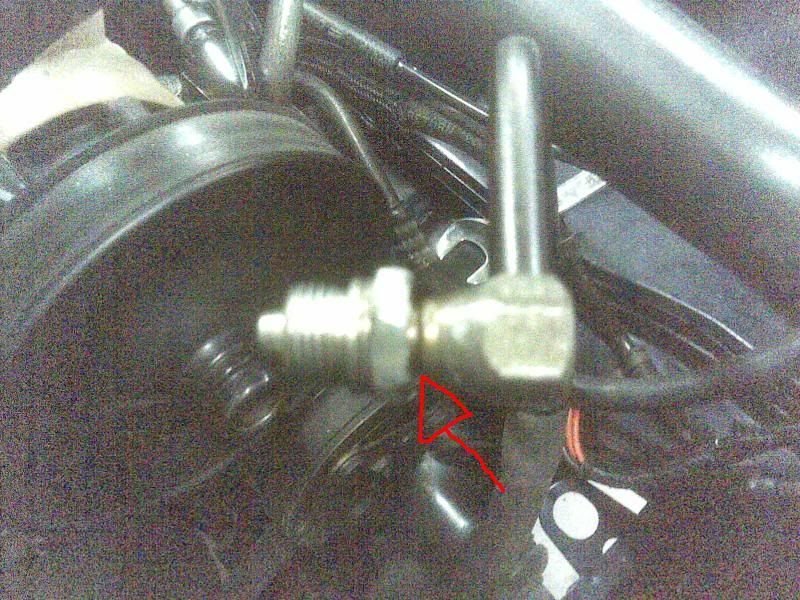
Replacing Ford NL Fairlane Power Steering Nut

Based on advice from fordmods, I purchased a BA 3F656B Nut from Ford. $17.

It looks like this one from ebay:


My original one looks very different - like this one:


I cut two grooves on opposite sides into my old nut using a ruby cutting blade and a Dremel.


I cut carefully using nut's internal rubber seal groove as a guide. Once I cut into this groove, I stopped cutting. I didn't cut deep enough to reach the other groove.


With a length of hardwood resting on concrete floor and cut to length, we used a cold chisel to crack nut in half. We were chiselling on hex part rather than on thread.


After a few hits it split.


My original nut had a small white nylon seal. New nut did not have anything like that so I installed a thin rubber o-ring - couldn't hurt I reasoned.

New nut just slides on to hose and clicks in place.

This is my new nut installed. The blue 'cape' is used to keep drips away from alternator.


Friday, 18 January 2013

How to Import Birthdays and Anniversaries into Google Calendar


This is a quick bash script I made that reads a file of events and creates an ical file suitable for importing into Google Calendar.

Date file supports these event formats:

day/month event description
day/month/year event description

Brief Instructions

1. Cut and paste program into a text file.

2. Save file as pc-ssv-to-ical.bash (or whatever you like)

3. In a terminal, chmod +x pc-ssv-to-ical.bash

4. Make an event file (eg. special dates) lile this:
1/1 New Year
26/1 Australia Day
4/4/1914 Someon'es Birthday
5/5/1915 Bill/Jill Wedding (1915)

5. Run ./pc-ssv-to-ical.bash special.dates > cal-import.ics 
6. Import cal-import.ics into a Google Calendar

Script

#!/bin/bash


#    This script takes events from a file and outputs in ical format 
#    suitable for importing into a Google Calendar.
#
#    Copyright (C) 2013  phil colbourn
#
#    This program is free software: you can redistribute it and/or modify
#    it under the terms of the GNU General Public License as published by
#    the Free Software Foundation, either version 3 of the License, or
#    (at your option) any later version.
#
#    This program is distributed in the hope that it will be useful,
#    but WITHOUT ANY WARRANTY; without even the implied warranty of
#    MERCHANTABILITY or FITNESS FOR A PARTICULAR PURPOSE.  See the
#    GNU General Public License for more details.
#
#    A copy of the GNU General Public License can be obtained from
#    .

SSV=$1

shopt -s extglob

# load special dates as day/month[/year] event description
# eg. 1/5/2004 A Person of Interest
# eg. 24/5 Not Sure When Born


# use this to convert SSV to CVS
# cat special-dates.ssv | sed 's/ /,/' > special-dates.csv


printf "BEGIN:VCALENDAR\nVERSION:2.0\nCALSCALE:GREGORIAN\n"


IFS+=","


while read DATE EVENT; do
    [[ -z $DATE ]] && continue               # ignore null dates
    # D/M[/Y] format
    D="0${DATE%%/*}"                         # get day part
    D="${D: -2}"   
    M="${DATE#*/}"                           # get month part
    M="0${M%%/*}"
    M="${M: -2}"
    # M/D[/Y] format
    #M="0${DATE%%/*}"                         # get month part
    #M="${M: -2}"   
    #D="${DATE#*/}"                           # get day part
    #D="0${D%%/*}"
    #D="${D: -2}"
    Y="${DATE/[0-9]?([0-9])[\/][0-9]?([0-9])/}"  # get year part
    Y=${Y//[\/]/}                            # remove left over /
    [[ -z $Y ]] && Y=$( date +%Y )           # use this year if none given

cat <
BEGIN:VEVENT
DTSTART;TZID=Australia/Sydney:${Y}${M}${D}
DTEND;TZID=Australia/Sydney:${Y}${M}${D}
RRULE:FREQ=YEARLY
DESCRIPTION:${EVENT}${Y:+ ($Y)}
SUMMARY:${EVENT}${Y:+ ($Y)}
END:VEVENT
EOF

done < $SSV

printf "END:VCALENDAR\n"

unset IFS

Notes

1. Code could be simplified if a more strict date format was used. eg. DD/MM[/YYYY]
2. Code will need to be changed for M/D[/Y] dates.
3. Space separated (SSV) and CSV formats both work. Quoted and double-quoted events also seem to work.

Sunday, 16 December 2012

Building and using a Linux UML environment

Intro

I want to test a script that randomly creates files all over a file system.

Naturally, I don't want to test this on my Linux system.

I tried fakechroot fakeroot chroot and schroot but I could not get them to do what I wanted.
fakechroot fakeroot chroot in particular allowed access to all files using '/..' - not what I wanted at all.

Method

I'm using pbuilder because it seems easy (once you know how).

  • It can also be run as a user.
  • It does not take up much space since UML environment is in a tar gzip file.
  • Changes within UML can be saved or lost (default).

To construct your sandpit

I called it 'sandpit', but you can call it what you like. Just replace sandpit with your preferred name.
Also, there is nothing stopping you making multiple sandpits.

pcreate -a amd64 -d lucid sandpit

I was running 64 bit Linux so I choose amd64
I did not care what distro I used so I choose lucid

To put/copy files into your sandpit

Files in ~/Projects/sandpit are available within your sandpit

cp ~/Projects/sandpit/

To get into your sandpit

ptest -p sandpit

After you exit, any changes will be gone.

To save changes in your sandpit

ptest -p sandpit --save


Sunday, 18 November 2012

Cleaning and Idle Speed Control Valve

In a previous post, I described how my NL Fairlane had an Idle problem and how I eventually got it fixed.

I later concluded that my old ISC must simply be clogged and devised a method to clean it.

Background

Idle Speed Control (ISC) valves are also known as Idle Air Controllers (IAC) and Bypass valves (BYP).

There are numerous patents for these devices. Mine is made by Hitachi, but this patent from BLD seems closest:


These Hitachi patents are also similar: US5188073US6571766, and US6065447

You can see that there are numerous patents for variations on this theme and I did not find them all.


Some describe how certain features work, but it seems that my ISC is powered by vacuum and limited by its solenoid. 

These designs have long-thin hollow shafts and tiny vent holes. It is very important to have these clean. 


One patent discusses how it should keep working even if these holes get blocked - sort of limp-home-mode.

Inside an ISC

I pulled apart an ISC that was supposed to be a replacement part for my car. It did not work and I decided to dismantle it.


A close-up of actual valve, shaft, and diaphragm.


These solenoids are complex. What is interesting is that they do not directly move a valve. They simply limit how far its valve can open.


Cleaning


Cleaning should not be a problem except that this is an electrical component and contains rubber seals and diaphragms that can not be directly seen or accessed.

I decided that I'd limit cleaning fluids to WD40 (or similar), Isopropyl alcohol, and compressed air.

Cleaning the parts that can be seen is straight forward: spray with WD40, scrub components gently with a small brush, blow out excess. Later you can rinse and with Isopropyl alcohol.

At one end you will see a spring over a tube that guides a valve shaft. This tube is fixed in place by a cast socket that has a small 3 mm diameter hole. This hole allows vacuum to pass through a shaft and into a space between solenoid and diaphragm. This space is also vented by brass fitting that is usually covered by a black filter.

Pull off this filter. At first this will be hard to do. Be gentle and work on it slowly to remove it undamaged.

I sprayed in WD40 through this vent and also through that hole mentioned above.

I then ran my air compressor up to about 10 PSI and connected it to that vent as shown below.


I cut a piece of plastic tube to force close my ISC's valve.

(My old ISC has a LPG modification that I have sealed with a blocked pipe. I also snapped off a flange by using an incorrect gasket.)


With this tube in place, I can pressurised diaphragm space using vent fitting, and by covering a large vent hole with my thumb.


By gently forcing air and WD40 through my ISC I was able to flush and clean out shaft and vents.


Monday, 12 November 2012

My Faulty Ford MAP Sensor


Inside a MAP (Manifold Absolute Pressure) sensor from an old Ford.

In my case, a Ford Fairlane NL, March 1998.

This one 'works' but it's output frequency is about half what it should be: 89 Hz instead of 160 Hz. I can't explain why. It still works - frequency varies with pressure.

Manifold pressure is measured by a round transducer (middle of picture). It is about 10 mm diameter and contains a square plate covered by a semi-liquid jelly. Covering and connecting this sensor to an external pipe fitting is a rubber boot (as pictured).

To test, I applied 5 V DC and used an oscilloscope to measure peak-to-peak output voltage and frequency.


I measured 0.2 V DC to about 5 V DC, 88.8 Hz, 50% duty cycle. 

Thursday, 25 October 2012

Put BenF firmware on DSO201

I have a DSO201, serial E1BE8DE3, Licence 1818C8BC, Device Firmware Upgrade V3.22A

I did the following to put on BenF's firmware packaged by Alf (5th post down):

I held '-' (down? key) while turning on. I got a firmware upgrade screen.

I connected my DSO to my Linux laptop USB port. I got a "DFU V3_22_A" mounted device in Nautilus file manager.

I extracted 2 hex files: V353_LIB.HEX and V364_APP.HEX from Alf's zip file.

I copied (dragged) V353_LIB.HEX to DFU V3_22_A device. After a second, my DFU device vanished and then reappeared. File name had changed to .RDY.

I copied (dragged) V364_APP.HEX to DFU V3_22_A device. After a second, my DFU device vanished and then reappeared. File name had changed to .RDY.

I ejected DFU device.

I disconnected USB cable.

I turned off DSO and back on a few seconds later.

Beautiful! BenF Firmware now running.

Thanks Alf.
Thanks BenF.
Thanks to whoever designed and made this open hardware, open software DSO!

I got mine from this seller on ebay: ljstore2009 

http://www.ebay.com.au/itm/160804672559?ssPageName=STRK:MEWNX:IT&_trksid=p3984.m1439.l2649#ht_5877wt_914

Sunday, 21 October 2012

On-line printing photos should not be this hard!

Are there are any other ways to store, manage, share and print our photos without being locked in to a single or subset of 'approved' suppliers?

OUR STORY

( for those that are bored with their life and want to be bored by ours )

My wife wanted to send a lot of photos to a company of her choice to be printed into a book. This time we chose BIG W Photos.

Should be easy.

PHOTO 'STORAGE'

Our digital photos are as well ordered as a junk shop: everything is in one place but no one knows exactly where.

To avoid having photos and duplicated photos spread across 20,000 devices in our family I have been trying to get all photos de-duplicated and uploaded to a cloud - I choose Picasa but it could have been any service.

UPLOADING

Getting photos there was not easy. Our cr48 ChromeBook would not work either by plugging in our camera or its SD card. So I switched to a laptop running Ubuntu. This worked but it was tedious.

SENDING TO BOOK PRINTER

Our chosen printing service is not on PicasaWeb's list so we now needed to download all photos to be printed and then upload them to our printer.

You can not do this from PicasaWeb unless you have a Picasa application installed. Google stopped supporting Picasa for Linux some time ago. I think this is good as we should be using web apps to become more device independent.

RE-DOWNLOADING

I discovered that I can download a zip file of all photos in an album from Google+.

Why can't I do this from PicasaWeb?

First we had to move or copy selected photos from one album to a new album because you can not download selected photos using Google+ - just an album.

UPLOADING

Now we have our selected photos in a directory on a laptop (again!), we could now upload them to our book printer.

None of this makes sense. This is daft!

TO FIX THIS WE NEED CLOUD PRINTING

If our printer was truly a cloud printer then we should be able to one-time-share or one-week-share our photos with them. They could then download what we selected and shared, print them and post a book to us.

This would be a bit closer to 'cloud' printing.

Saturday, 20 October 2012

Installing Ubuntu 12.10 on MacBookPro9,1 and all is good

Short Version

You need rEFInd, Ubuntu 12.10, 3.6 kernel, macfanctld.

All is good - except Nvidia drivers that did not work so well, especially by breaking resume which is something I must have.

Details


This is what I am doing:

Getting Ubuntu

Download ubuntu 12.10 - why not consider donating as well?
Burn to DVD.
Eject DVD.

Booting to Live Ubuntu

Shutdown MacBookPro9,1 (MBP).
Hold down 'option' key from here on.
Turn on MBP.
Push in DVD.
Hold down 'option' until you see pictures of hard drives and perhaps CDs and USBs.
Wait a while. Eventually you will see two DVDs: 'Windows' and 'EFI Boot'.
Click on 'EFI Boot'.
Select 'EFI Boot' with arrow keys and hit Enter.
Select 'Try Ununtu without installing' and hit Enter.
Ubuntu Live will start. This will take a few minutes.

Installing

Double-click 'Install Ubuntu 12.10'.
I then selected English and due to my own special requirements, I selected 'something else'.
You might like to try 'Install Ubuntu alongside...'

Note: if you select 'Erase disk and install Ubuntu' then you will get exactly that - my guess is that you DO NOT want to do that.

Here I have to setup my partition manually - you will not have to do this.
If you are interested in my setup, I have this:
sda1: efi 209 MB (EFI partition)
sda2: hfs+ 70 GB (OS-X)
sda3: hfs+ 650 MB (OS-X recover?)
sda4: biosgrub 200 MB (don't remember)
sda8: swap 20 GB
sda5: ext4 20 GB (linux root)
sda6: ext4 20 GB (linux root No. 2)
sda7: ext4 350 GB (/home)

(Boot loader on sda)

Selected Sydney, English(US) keyboard layout, created my user account, selected an icon, and Ubuntu started to install.

It was very quick to install for me.

Shutting Down

Hit 'Restart Now' button.
DVD ejected.
Hit Enter.
Hold down 'option' as soon as you here your MBP starting up.

Booting into Ubuntu

Hold down 'option' until you see pictures of hard drives and perhaps CDs and USBs.
Select 'Windows' and hit Enter.
I got an unhelpful 'Grub Recovery' prompt.
RATS!

Fixing Grub Recovery

I suspect that grub could not read or find my Ubuntu partition. Just a guess.
Odd. It is not as if there aren't very many MacBookPro9,1's around...
I have rEFInd installed so I tried that.
You can install rEFInd from OS-X. See here.
You may be able to use rEFIt if you have that installed, but I recommend rEFInd.

Booting using rEFInd

Shutdown.
Power on.
Select Ubuntu.
After some dodgy screen effects, Ubuntu booted to a blue background.

Getting 'Everything' Working

Ubuntu first wanted me to install language support.
To do this you will need a wired Ethernet connection to your Internet router.

Wireless

Install these packages
  • b43-fwcutter
  • linux-firmware (this should already be installed)
  • linux-firmware-nonfree
Reboot.

Note: I think a friend suggested bcmwl-kernel-source instead of these files, but it did not work for me - perhaps I misunderstood.

Kernel Upgrade

My previous experience suggests that a 3.6 kernel works better.
So I have installed four files from here - you can pick what kernel you want. Install the 'all' file, then the other header file followed by each image file.

UPDATE: I have found that only 3.7.0 and 3.7.5 (so far) work.

After a reboot, I noticed that my initial screen was no longer corrupted.

Fan

You have to have fan control or else your MBP will run too hot.
I used macfanctld from mactel support PPA (precise version).
I also have also written my own for a MBP4,1 that I'll test someday.

Summary

You need rEFInd, Ubuntu 12.10, 3.6 kernel, macfanctld.
Since Fan and sleep/wake are working now, I'm happy to turn this MBP into my daily compute.

I have also tried various Nvidia drivers - some work, but at a high cost of not resuming after standby. So I have removed these.


This works fine, but requires rEFInd. This is not a bad thing as rEFInd is really good, well documented and seems to be maintained by someone who knows a lot about EFI.

But, I want to try to boot to Linux without rEFInd. This may not be possible.

Another Attempt


Boot to OS-X.
Instructions taken from here - Read these. Below is just what I did, not something you should just blindly copy.
Download and install gdisk.
Open a terminal.
sudo gdisk /dev/disk0
I deleted my unwanted Linux partitions from previous attempts.
I created a new partition: id 99, 128M, type ef02 as per instructions.
Restart OS-X, hold down 'option' key and insert Ununtu DVD.
When available, select 'EFI Boot'.
Select 'Install Ubuntu'.
Select 'Something Else'.
Setup a 1 GB reiser boot, 19 GB ext4 root, 19 GB spare, 20 GB swap and rest is ext4 home.
After install, boot to OS-X.
sudo gdisk /dev/disk0
Follow instructions to remove hybrid MBR.
I made a Super Grub 2 Disk but it could not identify any grub 2 installation.

This got me no where, except I no longer have a 'dangerous' hybrid MBR.


Sunday, 7 October 2012

Ford Fairlane NL Idle Problem

I have a March 1998 Ford Fairlane NL. It has dual fuel (petrol and LPG).

It also seems to have a special version of Ford's 4.0L straight six engine.

http://autofix.com.au/blog/el-falcon-hybrid-engine-camshaft-timing

I recently had a significant head gasket leak which rendered my car unusable, but leading up to this I had slight coolant consumption and an increasingly annoying idle problem.

Coolant Leak

I had the head gasket done 3-4 years ago. About a year or more after this we noticed that coolant was slowly disappearing. It was just an annoyance so we put up with it. By loosing my radiator cap 1 notch we hardly ever had to add water or coolant.

Idle Problem

Leading up to my second head gasket failure, my Fairlane started to stall at seemingly random times - usually when my wife was driving and usually at a corner or intersection.

Over time, our Fairlane started to stall more and more until my wife would not drive it.

Blown Head Gasket

One day, after a trip to get some wood, my head gasket failed - very dramatic smoke screen.

I was not happy - head gaskets should last longer than this - but also supposed that my idle problem was probably linked to coolant being sucked into engine cylinders.

I decided to replace my head gasket myself this time, but that is a story for another blog.

After replacing my head gasket, it was obvious very quickly that my idle problem had not been fixed - in fact it seemed far worse.

Symptoms

Once my engine was at normal operating temperature it operates normally until I release my throttle. At this point my gear box is driving my engine so nothing happens, but once I begin to slow or brake and revs drop my idle problem begins.

Sometimes my engine revs drop below idle speed (about 750 RPM) and keeps on dropping until it stalls or I tap my throttle - so braking becomes a two foot process.

Recent Work

Due to other faults, I have recently replace these parts:

Fuel filter (Old one was full of rust)
Fuel rail, regulator and fuel injectors.
No.1 Cylinder spark plug - cracked
Distributor (suspect failed PIP sensor)
Leads
Ignition coil (cracked)
ECU (computer)
MAP sensor
ISC valve (but I put back original one because I need to modify my new one for LPG)

A few more parts and I will have a new car!

Diagnosis

I was fairly confident that none of these recently replaced parts were at fault. I was concerned that it could be my ISC valve, but a replacement one seemed worse.

I accessed my engine's ECU fault codes. It reported 'all ok' (code 111) but also 'engine running lean' (code 172).'

http://www.troublecodes.net/Ford/eec-iv.shtml

After some driving I noticed that when on LPG and when my engine would begin to stall, my LPG 'lean' light would be on. This seemed to confirm code 172. But when my LPG 'rich' light was on my engine would behave normally and it would not stall while moving or stopped.

I decided to try to test my oxygen sensor. This seems hard but I also came across people suggesting that water/coolant damages oxygen sensors - one person recommended replacing oxygen sensors when a head gasket is replaced - presumably because it is likely that coolant would be pumped into exhaust ports and would naturally come in contact with an oxygen sensor. Another suggested that moisture damages oxygen sensor heaters.

http://www.repcotrade.com.au/go/news/servicing-oxygen-sensors

http://www.fordaustraliaforums.com/forum/showthread.php?40030-Ef-el-faults-amp-fixes-simplified

http://www.hptuners.com/forum/showthread.php?t=27179

Theory

So my theory is that my long term coolant leaks have slowly been damaging my oxygen sensor, causing my engine to increasingly stall on occasions.

Solution

I have ordered a new oxygen sensor.

Oxygen sensor has arrived and is installed.

Results

There was some 'change' but nothing dramatic.

I installed my new ISC valve (That isn't what I bought - I paid about $95 AUD) and engine rarely stalls but it hunts - overshoots and undershoots and eventually stabilizes at 700 RPM.

But when idling to a stop, revs slowly drop to about 500 RPM. If revs drop below this something happens and revs pickup and my engine will sit at about 700 RPM.

What is now different is that on LPG my gas controller is indicating rich mixture when idling slow whereas before it was reporting lean.

Thoughts

* new ISC valve might be 'sticking' instead of moving smoothly - later testing casts doubt on this.
* ECU may not be driving ISC correctly - later proven ok.
* I wonder if I need to reset idle stop point? - later I did a small adjustment.
* some vacuum leak I have not found - found a few but nothing significant.
* ISC needs to be modified to LPG - I have not done this yet - now done.

More Results

For LPG, a gas pipe fitting was drilled into my ISC valve. This takes fumes from crank case via a one-way valve and burns them.

What seems odd to me is that it sucks very hard and I can not see how this is a controlled flow of fumes. It is only regulated by hose size (about 6 mm and a weighted 1-way valve that seems by design to leak).

Constricting this fume flow (squeezing hose with pliers) does seem to improve idle behaviour. I also recall inserting two 5 cm bamboo skewers into the hose to restrict flow so I decided to investigate this further.

PCV Valve

As I mentioned, this valve is closed by gravity and a light spring that does not seem to work unless it is open at least 3 mm.

Engine suction at idle is very high and it easily opens my PCV valve causing a lot of air to enter, bypassing ISC valve. Being an old engine, it 'breathes' a bit and this variation in air flow might be enough to cause idle instability.

I looked at my ISC signal using an oscilloscope and I could see it changing width of pulses to increase or decrease air flow - so ECU and ISC seem to be working.

My oscilloscope is a DSO201 worth about $70 AUD - it shows signals and calculates duty cycle, frequency, hi and low-pulse width - very handy.

I decided to re-design this by taking crank case fumes and injecting them in front of my throttle valve (this is when I found a small leak in a rubber bung).

My old ISC didn't like this change, but my new ISC was much happier - but I still had to adjust idle screw by 1/4 turn.

So perhaps my old ISC is not quite right.

Anyway, I have purchased a new PCV valve for $17 as well.

Vacuum Leaks

I found  a large tear in a flexible intake pipe. This could cause sudden loss of vacuum and cause instability - but this is not my problem.

I found a rubber bung had a small tear - this might affect LPG operation a tiny bit, but it shouldn't affect idle on petrol - so this is not my problem.

Result

Fixed!

Sort of.

There is a slight rev increase when coming to a stop. I had adjusted throttle stop 1/2 turn so I have moved it back 1/4 turn to see how that goes.

Engine does not hunt; it does not drop below about 600 RPM; it starts and idles ok (perhaps a little fast).

Postscript

After more trips, it was clear that all was not well. Idle speed still hunts and occasionally drops very low. My adjustment to throttle stop had also resulted in harsh gear 1 to 2 change.

I purchased another ISC (a second-hand one) and idle behaviour seems normal.