Showing posts with label Android. Show all posts

Thursday, 3 March 2011

Android Easter Egg

In case this is copied, go to the original site which should be http://philatwarrimoo.blogspot.com/2011/03/android-easter-egg.html

Goto Settings - About Phone
Scroll down to Android version
Tap quickly several times on 'Android version' and some art will appear.
'Zombie Art by Jack Larson'

Monday, 28 February 2011

Howto Sting Android Nexus One Droid Gingerbread

In case this is copied, go to the original site which should be http://philatwarrimoo.blogspot.com/2011/02/howto-sting-android-nexus-one-droid.html

Recently a blog of mine was copied and added to another site. I assume it was by a robot so I want to see if this gets copied as well.

I have added the important bait words such as:

1. Howto
2. Android
3. Nexus One
4. Droid
5. Gingerbread

But this time I have added a link on the top to this blog to see how many people get here from there.

An image to begin with...


So far, the tally is obviously zero since I am just writing it and it has not been saved or published - really I am just filling the space to make it look big enough for the bot to grab - assuming that it has some size range that it is interested in.

Another unrelated image:


An a link to the site - they might appreciate it.

http://www.premium-joomlathemes.com/jd-droid-drupal-template-drupal-hotel-theme-for-lodging-accommodation-with-t3-framework.html

Now for some real nonsense:

This nonsense comes from a pseudo text generator called Lorem Ipsum.

You can find more details here: http://www.lipsum.com/

Please note: I have copied text from another site and provided a link to it with thanks. Some could learn from this example - not that it is a very good example.

A sample nonsense would help:

The standard Lorem Ipsum passage, used since the 1500s

"Lorem ipsum dolor sit amet, consectetur adipisicing elit, sed do eiusmod tempor incididunt ut labore et dolore magna aliqua. Ut enim ad minim veniam, quis nostrud exercitation ullamco laboris nisi ut aliquip ex ea commodo consequat. Duis aute irure dolor in reprehenderit in voluptate velit esse cillum dolore eu fugiat nulla pariatur. Excepteur sint occaecat cupidatat non proident, sunt in culpa qui officia deserunt mollit anim id est laborum."
Section 1.10.32 of "de Finibus Bonorum et Malorum", written by Cicero in 45 BC

"Sed ut perspiciatis unde omnis iste natus error sit voluptatem accusantium doloremque laudantium, totam rem aperiam, eaque ipsa quae ab illo inventore veritatis et quasi architecto beatae vitae dicta sunt explicabo. Nemo enim ipsam voluptatem quia voluptas sit aspernatur aut odit aut fugit, sed quia consequuntur magni dolores eos qui ratione voluptatem sequi nesciunt. Neque porro quisquam est, qui dolorem ipsum quia dolor sit amet, consectetur, adipisci velit, sed quia non numquam eius modi tempora incidunt ut labore et dolore magnam aliquam quaerat voluptatem. Ut enim ad minima veniam, quis nostrum exercitationem ullam corporis suscipit laboriosam, nisi ut aliquid ex ea commodi consequatur? Quis autem vel eum iure reprehenderit qui in ea voluptate velit esse quam nihil molestiae consequatur, vel illum qui dolorem eum fugiat quo voluptas nulla pariatur?"

Saturday, 26 February 2011

Howto Vodafone UK Nexus One to Gingerbread

In case this is copied, go to the original site which should be http://philatwarrimoo.blogspot.com/2011/02/howto-vodafone-uk-nexus-one-to.html


A friend made this great guide.


http://ossadmin.wordpress.com/2011/02/26/goodbye-vodafone-uk-nexus-one-rom/


I have to same phone with the same Vodafone UK ROM and I kept my log of what I did in case it might help others.


All of the screenshots are from the above blog.


Notes:


All the following stages are similar. The first is a little different, but the others are virtually the same - the differences being the URL to get the file, and the name of the file to copy to your phone's SD card.


Sometimes the phone will automatically reboot after the installation of the update.zip file - other times you will need to manually reboot it by selecting the right menu item. All of this should be obvious.


Just follow these steps in order. If you get lost or miss a step, just start again (I did that a few times).


MD5


I do not know the original MD5 sums of the files listed below, but so you can verify that you get the same file as I did, here are my MD5 sums:

2854b06b22b9.signed-passion-FRG83G-from-FRG83D.2854b06b.zip
23a17e5f70d794858e0fe7aba308c3d7

766a101ae02c.signed-passion-ota-60505.766a101a.zip
1b3a95a92b0fd319f0e730b80e1e03ac

81304b2de707.signed-passion-GRI40-from-FRG83G.81304b2d.zip
706a4631271b6ee2c819ab548394b71e

ecb21b752065.signed-passion-FRG83D-from-FRG83.ecb21b75.zip
0fb26549e9de782e86e665a68693c50a

Passion_Google_WWE_2.16.1700.1_FRG33_MFG_Shipment_ROM.zip
3bcdbb83a4b951f813ca88771d69894d

passimg.zip (the file extracted from the file above)
d90635c2d269c6a26f77ae1a681e5424


Stage 1: Revert to Android 2.2


1. Get http://shipped-roms.com/download.php?category=android&model=Passion%20(Nexus%20One)&file=Passion_Google_WWE_2.16.1700.1_FRG33_MFG_Shipment_ROM.zip

2. Extract PASSIMG_Passion_Google_WWE_2.16.1700.1_FRG33_release_signed.zip
3. Rename to passimg.zip
4. Connect a USB cable to your computer and turn on USB storage
5. From your computer, copy passimp.zip to the root directory of your SD card
6. Eject USB device phone from your computer
7. Turn off USB storage
8. Power off the phone using the Power button (POWER) - like you normally would do
9. Hold down the Volume Down button (VOL DOWN) and keep it held down
10. Press and release (POWER)
11. When you see the white screen you can release (VOL DOWN)

A blue progress bar will be shown as it loads passimg.zip

12. After a while it will ask: 'Do you want to start update?' Press the Volume Up button (VOL UP) to say yes

The update will take a while. Progress is shown with various coloured progress bars

13. When done it will ask: 'Do you want to reboot device?' Press (VOL UP) to say yes

The phone will reboot

14. Disconnect the USB cable

The phone will say 'Welcome to Nexus One'. You don't want to do anything here so for me I skipped the setup like this:

15. Touch the screen
16. Tap the Skip button
17. Tap the Skip button
18. Tap Next button

Now, you can check to see if it all worked:

19. Find and launch the Settings app
20. Goto About phone

You should see the following:
Android Version: 2.2 Baseband Version: 32.41.00.32U_5.08.00.04 Kernel Version: 2.6.32.9-27237-gbe746fb android-build@apa26 #1 Build Number: FRG33

Stage 2: Upgrade to 2.2.1

1. Reconnect USB cable
2. Turn on USB storage
3. From your computer, delete passimg.zip from the SD card
5. Copy 766a101ae02c.signed-passion-ota-60505.766a101a.zip to the SD card
6. Rename it to update.zip
7. Eject the USB device phone from your computer
8. Turn off USB storage
9. Power off the phone
10. Hold down the Volume Down button (VOL DOWN) and keep it held down
11. Press and release (POWER)
12. When you see the white screen you can release (VOL DOWN)

It will quickly do something and then present 4 options


13. Press (VOL DOWN) to select the RECOVERY option
14. Press (POWER) to select RECOVERY

The phone will restart into a black ! screen


15. Press and hold (POWER)
16. Tap (VOL UP)
17. When you get a black screen you can release (POWER)


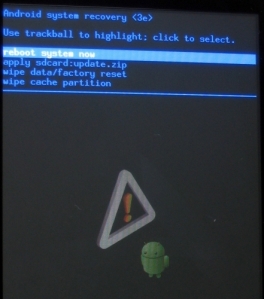
18. Use trackball to highlight 'apply sdcard:update.zip'
19. Click the trackball to select this

The installation will start. Progress is shown by an orange progress bar

The phone will eventually reboot

20. Disconnect usb cable

21. Goto About phone

You should see the following:
Android Version: 2.2.1Baseband Version: 32.36.00.28U_4.06.00.12_7 Kernel Version: 2.6.32.9-27240-gbca5320 android-build@apa26 #1 Build Number: FRG83

Stage 3: FRG83 to FRG83D


1. Reconnect USB cable
2. Turn on USB storage
3. From your computer, delete update.zip from the SD card
5. Copy ecb21b752065.signed-passion-FRG83D-from-FRG83.ecb21b75.zip to the SD card
6. Rename to update.zip
7. Eject the USB device phone from your computer
8. Turn off USB storage
9. Power off phone
10. Hold down the Volume Down button (VOL DOWN) and keep it held down
11. Press and release (POWER)
12. When you see the white screen you can release (VOL DOWN)

It will quickly do something and then present 4 options


13. Press (VOL DOWN) to select the RECOVERY option
14. Press (POWER) to select RECOVERY

The phone will restart into a black ! screen


15. Press and hold (POWER)
16. Tap (VOL UP)
17. When you get a black screen you can release (POWER)


18. Use trackball to highlight 'apply sdcard:update.zip'
19. Click the trackball to select this

The installation will start - progress is shown by an orange progress bar

The phone will eventually reboot or you need to select REBOOT

20. Disconnect usb cable

21. Goto About phone

You should see the following:

Android Version: 2.2.1Baseband Version: 32.36.00.28U_4.06.00.12_7 Kernel Version: 2.6.32.9-27240-gbca5320 android-build@apa26 #1 Build Number: FRG83D

Stage 4: Upgrade to 2.2.2 and FRG83G

1. Reconnect USB cable
2. Turn on USB storage
3. From your computer, delete update.zip from the SD card
5. Copy 2854b06b22b9.signed-passion-FRG83G-from-FRG83D.2854b06b.zip to the SD card
6. Rename to update.zip
7. Eject the USB device phone from your computer
8. Turn off USB storage
9. Power off phone
10. Hold down the Volume Down button (VOL DOWN) and keep it held down
11. Press and release (POWER)
12. When you see the white screen you can release (VOL DOWN)

It will quickly do something and then present 4 options


13. Press (VOL DOWN) to select the RECOVERY option
14. Press (POWER) to select RECOVERY

The phone will restart into a black ! screen


15. Press and hold (POWER)
16. Tap (VOL UP)
17. When you get a black screen you can release (POWER)


18. Use trackball to highlight 'apply sdcard:update.zip'
19. Click the trackball to select this

The installation will start - progress is shown by an orange progress bar

The phone will eventually reboot or you need to select REBOOT

20. Disconnect usb cable

21. Goto About phone

You should see the following:
Android Version: 2.2.2 Baseband Version: 32.36.00.28U_4.06.00.12_7 Kernel Version: 2.6.32.9-27240-gbca5320 android-build@apa26 #1 Build Number: FRG83G

Stage 5: Gingerbread

1. Reconnect USB cable
2. Turn on USB storage
3. From your computer, delete update.zip from the SD card
5. Copy 81304b2de707.signed-passion-GRI40-from-FRG83G.81304b2d.zip
6. Rename to update.zip
7. Eject the USB device phone from your computer
8. Turn off USB storage
9. Power off phone
10. Hold down the Volume Down button (VOL DOWN) and keep it held down
11. Press and release (POWER)
12. When you see the white screen you can release (VOL DOWN)

It will quickly do something and then present 4 options


13. Press (VOL DOWN) to select the RECOVERY option
14. Press (POWER) to select RECOVERY

The phone will restart into a black ! screen


15. Press and hold (POWER)
16. Tap (VOL UP)
17. When you get a black screen you can release (POWER)


18. Use trackball to highlight 'apply sdcard:update.zip'
19. Click the trackball to select this

The installation will start - progress is shown by an orange progress bar

The phone will eventually reboot or you need to select REBOOT

20. Disconnect usb cable

21. Goto About phone

You should see the following:
Android Version: 2.3.3 Baseband Version: 32.41.00.32U_5.08.00.04 Kernel Version: 2.6.35.7-59423-g08607d74 android-build@apa28 #1 Build Number: GRI40

Stage 6: Delete phone data (but not your SD card)

NB: I'm not sure this is required.

1. Goto Settings - Privacy - Factory data reset

If you want to keep your SD card data, DO NOT select 'Erase SD card'


Stage 7: Login and restore your apps

Once you enter your Google account details, your Google apps and settings should be restored. Your other apps will also be restored but y.our data will not be restored - use your backup

Any app not installed from the market will need to be manually restored.

I may have interrupted the restoration process by switching to a different WiFi Access Point - you probably should not do that.

Saturday, 1 May 2010

Steve Jobs on Flash

Steve Jobs has posted his thoughts on Adobe's Flash and why Apple have not allowed Flash to be installed on iPhones and iPads.

Adobe have, probably accidently, developed something like HTMLv5 years (8?) ahead of W3C. They saw the need for a standard, OS-agnostic platform for the development of applications and the presentation of content including video, audio, animation and interactivity.

Adobe's Actionscript was also fast. It seems that all other browsers felt that there was no need to work on Javascript speed because CPU's were getting faster each year - as a consequence of Moore's Law.

But something happened early this decade - CPU speed (clock rates) started to slow and to compensate, manufacturers began to introduce multi-core processors.

Web pages, however, seem to be hard to render using multiple threads and so Javascript performance began to stagnate.

Enter Google. They believe in open standards, an open web and everything running in the browser, sourced from the internet. To make this possible, Javascript needed to be fast so they started the Chrome browser project which incorporated a new and fast V8 Javascript engine. Shortly afterwards, it seemed, Webkit (Apple) and Mozilla began to pickup their Javascript performance as well. And now, we see Microsoft is also working on Javascript performance and standards compliance for IE9.

Adobe have had a good run, but standardisation has caught them up. (In a similar way, standardisation caught Lotus Notes which, for the time it was developed, was - or appeared to be - visionary: Tabbed workspace, forms, separation of data from presentation, security, encryption, signed applications...).

Back to Steve Job's posting. Steve thinks that Flash is closed and the Apple is the exact opposite - meaning open.

Open

First, there’s “Open”.
Adobe’s Flash products are 100% proprietary. They are only available from Adobe, and Adobe has sole authority as to their future enhancement, pricing, etc. While Adobe’s Flash products are widely available, this does not mean they are open, since they are controlled entirely by Adobe and available only from Adobe. By almost any definition, Flash is a closed system.
Apple has many proprietary products too. Though the operating system for the iPhone, iPod and iPad is proprietary, we strongly believe that all standards pertaining to the web should be open. Rather than use Flash, Apple has adopted HTML5, CSS and JavaScript – all open standards. Apple’s mobile devices all ship with high performance, low power implementations of these open standards. HTML5, the new web standard that has been adopted by Apple, Google and many others, lets web developers create advanced graphics, typography, animations and transitions without relying on third party browser plug-ins (like Flash). HTML5 is completely open and controlled by a standards committee, of which Apple is a member.
Apple even creates open standards for the web. For example, Apple began with a small open source project and created WebKit, a complete open-source HTML5 rendering engine that is the heart of the Safari web browser used in all our products. WebKit has been widely adopted. Google uses it for Android’s browser, Palm uses it, Nokia uses it, and RIM (Blackberry) has announced they will use it too. Almost every smartphone web browser other than Microsoft’s uses WebKit. By making its WebKit technology open, Apple has set the standard for mobile web browsers.


What if we take what Steve wrote and swap 'Apple' with 'Adobe' and 'Flash' with 'Mac OS X'? This is what we get:


Apple’s Mac OS X products are 100% proprietary. They are only available from Apple, and Apple has sole authority as to their future enhancement, pricing, etc. While Apple’s Mac OS X products are widely available, this does not mean they are open, since they are controlled entirely by Apple and available only from Apple. By almost any definition, Mac OS X is a closed system. 


It isn't perfect, but it is very close to the truth. Apple use open source, contribute to and develop with open source software, but they produce very proprietary software. You can not run OS X on any other hardware other than Apple hardware. To write well-integrated  OS X applications, you need to use Apple's proprietary interfaces - Carbon or Cocoa. These applications will not run on other OSs (Windows or Linux) and so some developers choose to use frameworks that allow developers to write applications that will run on any OS platform - or they use Java. Steve doesn't like this.

And now, use have to use Apple's APIs directly to write applications for the iPhone and iPad. This has upset Adobe (and probably a number of other organisations that make cross-platform frameworks such as XMLVM).

I think Steve accepts an open web, but everything else should be closed, and Apple is certainly insisting on this path. The iTunes store can only really be used with iTunes and iTunes can only be used with iPods and iPhones and now iPads.

I wonder when iTunes will stop supporting Windows?

iPhoto, iDVD and iMovie only work on OS X too. Keeping your photos on a Mac using Apple's software does tend you lock you in to using Apple hardware and software for a long time.

Full Web

Second, there’s the “full web”.
Adobe has repeatedly said that Apple mobile devices cannot access “the full web” because 75% of video on the web is in Flash. What they don’t say is that almost all this video is also available in a more modern format, H.264, and viewable on iPhones, iPods and iPads. YouTube, with an estimated 40% of the web’s video, shines in an app bundled on all Apple mobile devices, with the iPad offering perhaps the best YouTube discovery and viewing experience ever. Add to this video from Vimeo, Netflix, Facebook, ABC, CBS, CNN, MSNBC, Fox News, ESPN, NPR, Time, The New York Times, The Wall Street Journal, Sports Illustrated, People, National Geographic, and many, many others. iPhone, iPod and iPad users aren’t missing much video.
Another Adobe claim is that Apple devices cannot play Flash games. This is true. Fortunately, there are over 50,000 games and entertainment titles on the App Store, and many of them are free. There are more games and entertainment titles available for iPhone, iPod and iPad than for any other platform in the world.

Adobe claim that by not having Flash, iPhone users are missing out on the full web experience. It is true that any Flash content can not be displayed on the iPhone/iPad, but I think most web sites will develop special versions of their sites specifically for iPhone/Android devices that have limited screen sizes and limited user input interfaces: mice and touch pads offer very fine pointing and clicking controls whereas fingers are a little less accurate and cover-up what you are touching. On-screen keyboards are great but they are no match for a reasonably large physical keyboard.

In time, keyboards may well disappear, but they will be replaced with something that works as good as the real thing, not something that slows you down.

So iPhone and Android users alike are already missing some of the full web experience, but they have the advantage of mobility and newer customised web sites that will only make the experience better.

The existence or lack of H.264 is not really an issue. Flash now supports H.264 and any video will be in a format that iPhone users will be able to view. Interestingly H.264 is proprietary (and Apples has some interest in the patents associated with it) so Steve is not pushing for an open web experience here - he want's royalties and refuses to add the open source Ogg/Theora audio and video formats to Safari to help make the web truly open and free.

Security

Third, there’s reliability, security and performance.
Symantec recently highlighted Flash for having one of the worst security records in 2009. We also know first hand that Flash is the number one reason Macs crash. We have been working with Adobe to fix these problems, but they have persisted for several years now. We don’t want to reduce the reliability and security of our iPhones, iPods and iPads by adding Flash.
In addition, Flash has not performed well on mobile devices. We have routinely asked Adobe to show us Flash performing well on a mobile device, any mobile device, for a few years now. We have never seen it. Adobe publicly said that Flash would ship on a smartphone in early 2009, then the second half of 2009, then the first half of 2010, and now they say the second half of 2010. We think it will eventually ship, but we’re glad we didn’t hold our breath. Who knows how it will perform?

Steve is also worried about Adobe's Flash reliability and security. He has the statistics and claims that Flash is the number one cause of Mac crashes. I wonder what the number two cause is?

So, he say that it is best to keep Flash away from the iPhone and iPad.

Google has taken a different, seemingly more rational approach. They have decided to include Flash into Chrome and have made plans to address reliability and security issues.

Google seeks to eliminate problems rather than add layers to reduce risk. Their Native Client does just this: an architecture to allow any plugin to run so long as it can be validated that it complies to hard rules to that prevent software doing anything harmful. This has to be better than validated compiler tool chains, signed applications, layers of malware filtering and heuristic code analysis.

Battery Life

Fourth, there’s battery life.
To achieve long battery life when playing video, mobile devices must decode the video in hardware; decoding it in software uses too much power. Many of the chips used in modern mobile devices contain a decoder called H.264 – an industry standard that is used in every Blu-ray DVD player and has been adopted by Apple, Google (YouTube), Vimeo, Netflix and many other companies.
Although Flash has recently added support for H.264, the video on almost all Flash websites currently requires an older generation decoder that is not implemented in mobile chips and must be run in software. The difference is striking: on an iPhone, for example, H.264 videos play for up to 10 hours, while videos decoded in software play for less than 5 hours before the battery is fully drained.
When websites re-encode their videos using H.264, they can offer them without using Flash at all. They play perfectly in browsers like Apple’s Safari and Google’s Chrome without any plugins whatsoever, and look great on iPhones, iPods and iPads.

Steve ignores other Flash applications here (which may or may not be kind to battery life) and focuses on H.264 video playback. Again, if Flash now supports H.264 then this is a non-issue (except that web sites would need to re-encode their content which they have to do for the iPhone/iPad anyway).

Touch


Fifth, there’s Touch.
Flash was designed for PCs using mice, not for touch screens using fingers. For example, many Flash websites rely on “rollovers”, which pop up menus or other elements when the mouse arrow hovers over a specific spot. Apple’s revolutionary multi-touch interface doesn’t use a mouse, and there is no concept of a rollover. Most Flash websites will need to be rewritten to support touch-based devices. If developers need to rewrite their Flash websites, why not use modern technologies like HTML5, CSS and JavaScript?
Even if iPhones, iPods and iPads ran Flash, it would not solve the problem that most Flash websites need to be rewritten to support touch-based devices.


Steve says that touch interfaces don't work the same as mice/touchpads and therefore Flash applications wont work anyway. Interestingly, Flash started out as a PenPoint OS which may have had similar behaviour to a touch interface, but I don't know.

What Steve fails to mention is that many web sites also make use of mouseover events to show text and graphics as your mouse pointer hovers over a particular word, link or image. Blogger uses tooltips which help a little in explaining the function of a button. Even Apple's web store for the iPhone uses 'rollovers' to display the help, account and cart menus! I guess Apple had to re-write these sites for the iPhone.

Actually, I just checked - the store is virtually unusable on an iPod touch. You can click on the help menu and a menu will be displayed so you can then double-touch to zoom in. Wouldn't this work for Flash too?

All web sites that need mouseover events to operate will have to be re-written for the iPhone so banning Flash does not fix this - the web site owner needs to do some work to make their sites more accessible for iPhone and iPad users. So why is this an issue Steve? This looks like hypocrisy to me.

The 'real' reason

Sixth, the most important reason.
Besides the fact that Flash is closed and proprietary, has major technical drawbacks, and doesn’t support touch based devices, there is an even more important reason we do not allow Flash on iPhones, iPods and iPads. We have discussed the downsides of using Flash to play video and interactive content from websites, but Adobe also wants developers to adopt Flash to create apps that run on our mobile devices.
We know from painful experience that letting a third party layer of software come between the platform and the developer ultimately results in sub-standard apps and hinders the enhancement and progress of the platform. If developers grow dependent on third party development libraries and tools, they can only take advantage of platform enhancements if and when the third party chooses to adopt the new features. We cannot be at the mercy of a third party deciding if and when they will make our enhancements available to our developers.
This becomes even worse if the third party is supplying a cross platform development tool. The third party may not adopt enhancements from one platform unless they are available on all of their supported platforms. Hence developers only have access to the lowest common denominator set of features. Again, we cannot accept an outcome where developers are blocked from using our innovations and enhancements because they are not available on our competitor’s platforms.
Flash is a cross platform development tool. It is not Adobe’s goal to help developers write the best iPhone, iPod and iPad apps. It is their goal to help developers write cross platform apps. And Adobe has been painfully slow to adopt enhancements to Apple’s platforms. For example, although Mac OS X has been shipping for almost 10 years now, Adobe just adopted it fully (Cocoa) two weeks ago when they shipped CS5. Adobe was the last major third party developer to fully adopt Mac OS X.
Our motivation is simple – we want to provide the most advanced and innovative platform to our developers, and we want them to stand directly on the shoulders of this platform and create the best apps the world has ever seen. We want to continually enhance the platform so developers can create even more amazing, powerful, fun and useful applications. Everyone wins – we sell more devices because we have the best apps, developers reach a wider and wider audience and customer base, and users are continually delighted by the best and broadest selection of apps on any platform.

Steve simply wants to make it hard for any developer to write applications for multiple platforms.

It may be true that frameworks limit the features, but equally it may be true that the Apple iPhone/iPad OS is the lowest common denominator - why do you think that Apple will always have more features that your competitors? Can you merge directories of the same name in OS X Finder yet?

If this is a real reason, then why not specify that any framework must support the whole API? This surely would address your concerns about having all the features available to the developer.

Conclusion


I am not a fan of Flash, but it is generally required for YouTube for PC and laptop users.

I agree the HTMLv5 is the future but I disagree that it should only include a patented and proprietary H.264.

Apple could allow Flash on the iPhone since web sites have to be re-written anyway for iPhone users.

Battery life while playing videos may not be an issue if Flash on the iPhone/iPad used H.264 and Flash had access the Apple's H.264 API.

Security is solvable and Google and Adobe seem to be about to demonstrate this.

Postscript

The person who sent me the link to Steve's posting owns a Mac and an iPod that I know for certain. They are going to say 'bye bye' to Apple based on Steve's compelling argument against proprietary software:
Jobs makes a compelling case for not trusting a proprietary company who has sole control over their proprietary products.
So, bye bye Apple.

I have 3 Mac Book Pros, iPod Nano, iPod Touch, Time Capsule and have been influential in at least the purchase of a Mac Mini over the last 5 years (about $15,000 worth at time of purchase). I am re-considering my use of Apple software and hardware and I will certainly not purchase anywhere near the amount of Apple products in the next 5 years - if any.

I will also be removing the shackles of proprietary Apple software by moving my photo and music collections to Open Source software and online services such as Google Docs. Not just because of this open letter about Flash, but because Apple is removing people's freedom to develop and use software the way they choose to.

Saturday, 10 April 2010

Apple's new iPhone license agreement

ars technica covers it well


http://arstechnica.com/apple/news/2010/04/apple-takes-aim-at-adobe-or-android.ars?utm_source=rss&utm_medium=rss&utm_campaign=rss


Apple's new API license includes the following:


The new version of 3.3.1 reads:
3.3.1 — Applications may only use Documented APIs in the manner prescribed by Apple and must not use or call any private APIs. Applications must be originally written in Objective-C, C, C++, or JavaScript as executed by the iPhone OS WebKit engine, and only code written in C, C++, and Objective-C may compile and directly link against the Documented APIs (e.g., Applications that link to Documented APIs through an intermediary translation or compatibility layer or tool are prohibited).
This seems to mean that developers can not use tools that translate programs from one platform to the iPhone, or frameworks that try to make all smart-phones look-alike.

This is clearly a closed, dictatorial stance.

There are already many iPhone apps and games that are openly built this way - what do they do?


But how can they test that a code-generator/cross compiler was used?

Perhaps this will spawn a new breed of code-generators that actually translate code from one language to another with same variable names, comments, parameters, etc.

Now that would be cool.

Wednesday, 10 February 2010

The iPad and the new GoogleOS

I like it.

Apple's insistence on using storage to differentiate pricing is an OK idea, but the price difference between models is hard to support.

Anyway, in my last post I dreamt of my ideal device. Now that the iPad has been seen by most, you could visualise my ideal device as an iPad that folds in half.

It, of course, needs a camera, needs to work as a phone and needs to run ChromeOS, but otherwise it is close.

Folded in half it would be about 7.5"x4.8" (190mm x 120mm), 1" (25mm) thick.

The Future

I think the PC has matured and is in decline. 

Netbooks have harmed the laptop market. Their low cost and high portability has meant that laptops and desktop have had to cut margins to sell. Microsoft too, has probably had to reduce margins to ensure their OS - old as it is - is the de-facto standard. I recently saw that Aldi advertised a 17" Core II Duo laptop with everything you could need for $900 AU. Even though it is many times better in almost every respect, the market wants laptops to be sub $1000 AU.

Where a big laptop fails is it's size. Consumers have their adequate 15" laptop or their 22" desktop and it still does the job just fine - even with Windows XP. They now want to be free to roam around their homes or around town with a take-anywhere Netbook.

They have their big-screen touch phones too. Great as a phone and as a media player but they are not too good at web browsing. So a market is born: a small screen web browser.

The Netbook was first and does the job by scaling down a laptop so that it is ultra portable. Apple thought better, and made a smaller device that still offered a 10" screen that could be used in portrait or landscape. And they added 3G for that always-on experience.

What the iPhone, Androids and Nokia's have shown, is that the new killer-app is an app store. A place to buy your software, be it office applications, games, music, video, books or just cool toys.

The OS is irrelevant.

The design is far more important than the hardware. Low powered computers are fast enough - adequate. You don't need to worry about storage, frame rates, resolution and interfaces since they have everything that you typically need. Now it is more important to consider looks, weight, portability, battery life and Apps.

What Apple and Google have also done is to reduce the risk of malware by selecting the ARM microprocessor and a more secure-by-design operating system. ARM processors don't allow some of the techniques used to cause a PC to execute foreign code, and UNIX and Linux have demonstrated that they are resistant to malware.

Apps too, are more likely to be web apps - based on HTML and JavaScript. These can be easily sandboxed to protect the OS and other core applications and services. Google also has their Native Client which allows native compiled code to run safely and securely on a PC or ARM machine.

A new OS will enter the scene.

Perhaps a few. Windows will decline as more devices are sold with Android, Linux and OS-X. I don't think Symbian will survive either.

If the OS is irrelevant then it will shrink and become a specific purpose, custom OS for the particular device. If all the applications run in a browser then applications will no longer depend on OS services. Instead they will mostly depend on browser services - the browser is the new OS and it includes the secure, windowing/graphics environment for games, music, videos, office applications and browsing.

Recently Google released a new programming language called Go. To me, it seems to be a descendant of a language designed at Bell Labs called Newsqueak. Rob Pike developed Newsqueak and is also developing Go. Ken Thompson, who also worked at Bell Labs, is also part of the Go development effort at Google. Both Newsqueak and Go are used to do systems programming - a language to build or experiment with operating systems. Why would Google want that - they use Linux don't they?

Ken Thompson and Rob Pike both worked on Plan 9 and it's descendent, Inferno, which was open-sourced in 2005.

I think Google is looking to use Go to compile a descendant of Inferno to become the base OS for Google and Android. Why? Go makes concurrent programming easy, and future servers and appliances are going to have lots of CPUs and GPUs.

Background

This is a video (2007) of Rob Pike talking about Newsqueak, Plan-9 and a toy window system.